
Making and breaking the grid
For designers working in every medium, layout is arguably the most basic, and most important, element. Effective layout is essential to communication and enables the end user not only to be drawn in with an innovative design but to digest information easily. Making and Breaking the Grid is a comprehensive layout design workshop that assumes that in order to effectively break the rules of grid-based design, one must first understand those rules and see them applied in real-world projects. Text reveals top designers' work in process and rationale. Projects with similar characteristics are linked through a simple notational system that encourages exploration and comparison of structure ideas. Also included are historical overviews that summarize the development of layout concepts, both grid-based and non-grid based, in modern design practice.
Stats for nerds
3recommend
4mentions
4people
2011–2019years
75% recommend25% neutral
Mentions per year
What Hacker News says
- This is amazing. Thank you! The world needs more isometric diagrams (since they're able to communicate more with no perspective diminishing). To my mind, a lot more product/service discovery could use isometric diagrams in their landing pages. In addition, visualizing app/page navigation and funnels. I really think it's untapped. I've tried to cobble together my understanding of isometric design over the years from different skillshare or lynda tutorials. I've tried Maya and other modeling applications to create more detailed models. And gone back to using the SSR approach (using Illustrator - though as an engineer I still have so far to go there - great skillshare courses by Daniel Scott). Gotten into Sarah Drasner's great design for developer courses. (Making and Breaking the Grid mentioned there is a great book.) Recently via https://medium.com/@PepsRyuu/why-i-no-longer-use-d3-js-b8288... and a desire to use the minimum tools necessary to get the job done, I'm totally aligned in taking a more css only approach (eschewing SVG for the reasons mentioned in that article - particularly text wrapping).
A long way of saying this is really interesting. Thanks!
- An alternative approach:
– Start by reading "Magic Ink" by Bret Victor: http://worrydream.com/#!/MagicInk
– Now you understand that UI design is actually graphic design, so start with graphic design fundamentals. They are: Drawing, Layout, Typography, Color, History.
– Drawing: understand how images are created on a canvas. Includes concepts of how to use line, shade, and color to create forms, volumes, depth, etc. Art historians talk about "color and line" in painting. Understand the distinction. Pick up a used copy of Janson's History of Art. Peruse some other books about drawing. Go to the museum. Whatever you come across. Have fun with it.
– Layout: I haven't found a great resource for this. You can have a look at Grid Systems by Josef Müller-Brockman, which set the tone for layout in the 20th century. Making and Breaking the Grid is a modern spin on grid-based layout. Read about book design since that's the oldest and most developed layout system. You can start with Wikipedia: http://en.wikipedia.org/wiki/Book_design. Generally pay attention to how websites are arranged. Is there a top-bar or a side-bar? How many sections of content are there? What is their relative proportion? How does the layout relate to the borders of the browser window? Take some time to investigate 'responsive design'. Understand what it means to design from the content out rather than from the edges in. Understand the fact that book design has a rich set of systems of proportion while web designers completely ignore this for the most part. Look up 'golden ratio typography'.
– Typography: there are a number of well-regarded classics on typography. The Elements of Typographic Style is great. But you should start with this: http://webtypography.net/. Then check out the Wikipedia entry and Google around for blog posts about typography. Once you understand the basics, then attempt an in-depth text. The most important thing to understand is that typography can be used to create structure. People who do not understand this use lines, planes, and volumes to create structure around content. A good place to learn about this is in Edward Tufte's The Visual Display of Quantitative Information (as well as its sequels). He vigorously recommends removing as much "non-data ink" as possible. Beyond structure, there is the issue of choosing typefaces. Let me just get this one out of the way: serif faces are not significantly easier to read than sans-serif faces. Beyond that, understand that typefaces are created by designers for different uses. Use typefaces according to what they're designed for. Understand how typefaces are used to create a stylistic feel, to evoke associations, nostalgia, emotion. Understand that some typefaces are expressive and some are not. The web so far has favored non-expressive typefaces. Now that we have @font-face and Google Fonts, people are going crazy using different type-faces will-nilly. Web design will evolve. Watch the documentary "Helvetica".
– Color: there are many resources on color, but the study of color is an endeavor that can last a lifetime. There are a few things to understand about color: what it is (light frequency / a sensation), how it is modelled (Newton vs. Goethe, HSL/RGB, color spaces, Pantone), how it is created, how colors are combined, the fundamental nature of each hue, and psychological meaning of color combinations. Start with the Wikipedia entry. For more scientific information, check out the IESNA handbook. Understand the difference between Newton's and Goethe's studies of color and how current theories descend from those. After them came Maxwell, Helmholtz, and others. Munsell's text is responsible for much of the exploration of color in early modernist painting (impressionism, etc.): http://www.gutenberg.org/files/26054/26054-h/26054-h.htm. Study color combining by way of texts from the early 20th century by Albers, Itten, etc. But, as others have mentioned, the only way to truly understand color is to use it. Try different combinations, see what they do. Ask questions like: why are most websites blue? Why aren't websites ever yellow? Beyond cultural associations, each color has a fundamentally different nature and use. It's not just a spectrum. Why is red so special? Notice that blue and yellow are, in Goethe's theory, the fundamental colors from which all colors are created. Does this have something to do with their neutrality? The sun is yellow, the sky is blue, the ocean is blue... what does it all mean? Why are the road signs green?
– History: web design didn't just come out of nowhere, though most web designers are uneducated and the tools have been very primitive up until the last few years, so it kind of seems that way. Find a copy of Meggs' History of Design. Understand what it is, where it comes from, how book design is the father of graphic design. Then, something crucial to understand: that web design is constrained by the concepts of the past, which were developed in a world with different constraints. Do you know how graphics were created before computers?
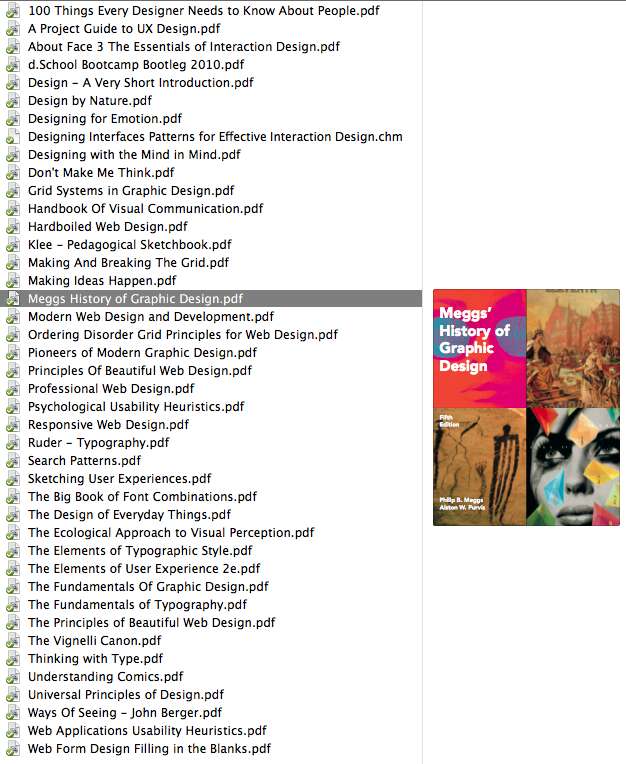
Unfortunately there is no good book that gives an overview of all of this material. You need to piece it together. Here's a screenshot of my library of design books: http://img823.imageshack.us/img823/7795/screenshot20120731at.... Plus you should have a library of design inspiration. I have mine spread out between LittleSnapper and ZooTool right now. Evernote is another good way if you can stand all the visual noise in their interface. Other people use Pinterest, etc.
What you should take away from this is that UI design is actually part of graphic design, which is a relatively old discipline (though still young compared to, say, architecture).
On the other hand it can be said that UI/UX rather encompasses graphic design since UX brings in the notion of user-centered design from HCI, which has its own history in psychology and the US military industrial complex. Two great historical reads here are MIL STD 1472F: http://www.hf.faa.gov/docs/508/docs/milstd14.pdf and The Ecological Approach to Visual Perception by J.J. Gibson (from whence the concept of "affordance" comes). The classic synthesis of these ideas can be found in The Design of Everyday Things by Donald Norman. Bill Buxton is another person to follow in this space. A modern synthesis of UX is About Face 3: The Essentials of Interaction Design.
EDIT: fixed links
- The book list in readable format:
Before & After Page Design Typography Workbook: A Real-World Guide to Using Type in Graphic Design Thinking with Type: A Primer for Designers How Designers Think Information Dashboard Design: The Effective Visual Communication of Data Making and Breaking the Grid: A Graphic Design Layout Workshop The Designer's Guide to Color Combinations Emotional Design: Why We Love (or Hate) Everyday Things The New Typography - IMHO you first need to understand design, its various sub fields (i.e. typography, colors, layout), user experience design/interaction design/usability, and finally how all of this applies to the web. You can learn the basics by reading books but the only way to truly understand and master is by study this things in the world and by practicing them. Start thinking about design, analyze it in your daily life, do your own makeovers of sites you use, design a blog theme, etc, etc.
As for web typography, you want to check of the latest generation of font embedding because that's where the real magic's at. The most known web font solutions are: CSS3 (font-face), typeface.js, cufon, flir, sifr, Google Font API, Typekit.
Here's a list of quality books on design and typography:
Books on web design:A History of Graphic Design Before & After Page Design Designing Brand Identity Emotional Design: Why We Love (or Hate) Everyday Things Graphic Design Solutions How Designers Think Information Dashboard Design: The Effective Visual Communication of Data Making and Breaking the Grid: A Graphic Design Layout Workshop The Complete Manual of Typography The Designer's Guide to Color Combinations The Elements of Graphic Design: Space, Unity, Page Architecture, and Type The Elements of Typographic Style The New Typography The Visual Display of Quantitative Information Thinking with Type: A Primer for Designers Typography Workbook: A Real-World Guide to Using Type in Graphic DesignAbout Face 3: The Essentials of Interaction Design Ambient Findability: What We Find Changes Who We Become Bulletproof Web Design Cascading Style Sheets: The Definitive Guide Designing Web Usability Designing With Web Standards Designing the Obvious: A Common Sense Approach to Web Application Design Designing the User Interface: Strategies for Effective Human-Computer Interaction Don't Make Me Think: A Common Sense Approach to Web Usability Homepage Usability: 50 Websites Deconstructed Information Architecture for the World Wide Web: Designing Large-Scale Web Sites Information Architecture: Blueprints for the Web Interaction Design: Beyond Human-Computer Interaction Rocket Surgery Made Easy: The Do-It-Yourself Guide to Finding and Fixing Usability Problems The Essential Guide to User Interface Design The Inmates Are Running the Asylum Thoughtful Interaction Design: A Design Perspective on Information Technology Web Form Design: Filling in the Blanks
Related

Computer graphics
11 recommend · 14

Design Elements
2 recommend · 2

Grid Systems in Graphic Design
15 recommend · 22

The grid
6 recommend · 7

Domain-Driven Design
104 recommend · 252

Physically Based Rendering
92 recommend · 157

The Timeless Way of Building
recommend · 134